The BeCOMS® Data_Logger and Data_Indicator software is designed and tested to run under the following Microsoft operating systems:
- Windows 7
- Windows 8.x
- Windows 1x
Please refer to Chapter 3.4 Optional Data Logger PC with Data_Logger Software for requirements to the personal computer needed for the software.
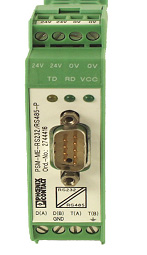
- If a “Not connected” message appears in the event window after you have started “Data_Logger”, the following steps may fix the problem in case the RS-485 converter is used:
- Is the RS-485 converter’s green power-LED on? Check the power supply.

- Is the wiring of the RS-485 interface reversed (connection A and B).
This is the most common cause of error!
- Is the RS-485 converter connected to the correct COM port? If connected correctly, the transmit LED (TX) (Fig. 8.1) should blink after measurement start to indicate that computer is sending data.
- If the connection is established, this is confirmed by a “Connected” message in the event window. (Fig. 8.2 on next page)